Tuesday, March 27, 2018

XAF best practices 2017-04

XAF best practices 2017-04


In my last post i covered a small portion of business logic, containing controllers and actions. Today I'll cover 2 things: Avoiding string magic with View-ID's and how to build criterias.

View-ID's

A lot of code i see when reviewing others XAF-Source code is dealing with View-ID's.
XAF generates 3 View's for every BusinessObject: a DetailView, a ListView and a LookupListView. They are structured the following way: NameOfTheBusinessObject_TypeOfView.
Those view id's are often used in controllers, and sometimes stored in the database for more dynamic applications.
I didn't know about this handy helper class provided by the XAF-Team: The DevExpress.ExpressApp.Model.NodeGenerators.ModelNodeIdHelper!
It's a simple helper class with 4 very helpful methods: GetDetailViewIdGetListViewIdGetLookupListViewId and GetNestedListViewId!
Let's have a look:
var detailViewId = ModelNodeIdHelper.GetDetailViewId(typeof(LabelDemoModel)); //LabelDemoModel_DetailView
var listViewId = ModelNodeIdHelper.GetListViewId(typeof(LabelDemoModel)); //LabelDemoModel_ListView
var lookupListViewId = ModelNodeIdHelper.GetLookupListViewId(typeof(LabelDemoModel)); //LabelDemoModel_LookupListView
The last one GetNestedListViewId provides a LookupLiewView of a nested ListView. For example if you got an aggregate root Person with an one to many relationship Contacts(for example phone, email, ect.).
The usage will look something like this:
var nestedListViewId = ModelNodeIdHelper.GetNestedListViewId(typeof(Person), nameof(Person.Contacts)); //Person_Contacts_ListView
In this case XAF will generate a separate nested ListView of the Contacts type excluding the reference on Person. This is logical, cause in a nested ListView the Person field doesn't make sense.
Another thing i like to provide is a separate class in the Contracts assembly to provide easy access to all ViewId's that are used in code.
using System;
using System.Linq;
using DevExpress.ExpressApp.Model.NodeGenerators;

namespace Scissors.FeatureCenter.Modules.LabelEditorDemos.Contracts
{
    public static class ViewIds
    {
        public static class LabelDemoModel
        {
            public static readonly string DetailView = ModelNodeIdHelper.GetDetailViewId(typeof(BusinessObjects.LabelDemoModel));
            public static readonly string ListView = ModelNodeIdHelper.GetListViewId(typeof(BusinessObjects.LabelDemoModel));
            public static readonly string LookupListView = ModelNodeIdHelper.GetDetailViewId(typeof(BusinessObjects.LabelDemoModel));
        }
    }
}
So you can write a controller like this:
public LabelDemoModelObjectViewController()
{
    TargetViewId = ViewIds.LabelDemoModel.DetailView;
}

Criterias

Next we look how we can avoid strings when building criterias. This will help a lot if you need to refactor code later and don't want to break every criteria you've written so far. There are 2 possible options. The first one is using the FieldsClass that is now integrated into CodeRush since 17.1.5
XPO FieldsClass
Another way is to use the power of Expressions. Thats the stuff that powers LINQ.
Lets have a look:
using System;
using System.Linq.Expressions;
using System.Text;

namespace Scissors.Utils
{
    public static class ExpressionHelper
    {
        public static MemberExpression GetMemberExpression(Expression expression)
        {
            if(expression is MemberExpression)
            {
                return (MemberExpression)expression;
            }
            if(expression is LambdaExpression)
            {
                var lambdaExpression = expression as LambdaExpression;
                if(lambdaExpression.Body is MemberExpression)
                {
                    return (MemberExpression)lambdaExpression.Body;
                }
                if(lambdaExpression.Body is UnaryExpression)
                {
                    return ((MemberExpression)((UnaryExpression)lambdaExpression.Body).Operand);
                }
            }
            return null;
        }

        public static string GetPropertyPath(Expression expr)
        {
            var path = new StringBuilder();
            var memberExpression = GetMemberExpression(expr);

            do
            {
                path.Insert(0, $".{memberExpression.Member.Name}");

                if(memberExpression.Expression is UnaryExpression ue)
                {
                    memberExpression = GetMemberExpression(ue.Operand);
                }
                else
                {
                    memberExpression = GetMemberExpression(memberExpression.Expression);
                }
            }
            while(memberExpression != null);

            path.Remove(0, 1);
            return path.ToString();
        }
    }
}
Now lets have a look what that does:
using System;
using System.Linq;
using System.Linq.Expressions;
using Shouldly;
using Xunit;

namespace Scissors.Utils.Tests
{
    public class ExpressionHelperTests
    {
        class TargetClass
        {
            public TargetClass A { get; set; }
            public TargetClass B { get; set; }
            public TargetClass C { get; set; }
        }

        string PropertyName(Expression> expression)
            => ExpressionHelper.GetPropertyPath(expression);

        [Fact]
        public void SimplePathA()
            => PropertyName(m => m.A).ShouldBe("A");

        [Fact]
        public void SimplePathB()
            => PropertyName(m => m.B).ShouldBe("B");

        [Fact]
        public void SimplePathC()
            => PropertyName(m => m.C).ShouldBe("C");

        [Fact]
        public void ComplexPath1()
            => PropertyName(m => m.A.A.A.B.C.A).ShouldBe("A.A.A.B.C.A");

        [Fact]
        public void ComplexPath2()
            => PropertyName(m => m.C.A.B).ShouldBe("C.A.B");
    }
}
Awesome! That helps us to write a simple helper class for XPO:
using System;
using System.Linq;
using System.Linq.Expressions;
using DevExpress.Data.Filtering;
using DevExpress.Xpo;
using Scissors.Utils;

namespace Scissors.Xpo
{
    public class ExpressionHelper<TObj>
    {
        public string Property(Expression> expr)
            => GetPropertyPath(expr);

        public OperandProperty Operand(Expression> expr)
            => GetOperand(expr);

        public OperandProperty TypeOperand(Expression> expr)
            => new OperandProperty($"{ExpressionHelper.GetPropertyPath(expr)}.{XPObjectType.ObjectTypePropertyName}.TypeName");

        public BinaryOperator IsType(Expression> expr, Type t)
            => TypeOperand(expr) == t.FullName;

        public static string GetPropertyPath(Expression> expr)
            => ExpressionHelper.GetPropertyPath(expr);

        public static OperandProperty GetOperand(Expression> expr)
            => new OperandProperty(ExpressionHelper.GetPropertyPath(expr));

        public static BinaryOperator GetObjectTypeOperator(Expression> expr, Type objectType)
            => new OperandProperty($"{ExpressionHelper.GetPropertyPath(expr)}.{XPObjectType.ObjectTypePropertyName}") == objectType.FullName;

        public static BinaryOperator GetObjectTypeOperator()
            => new OperandProperty(XPObjectType.ObjectTypePropertyName) == typeof(TObj).FullName;
    }
}
Cool stuff! How do we use it? Extend the LabelDemoModel class:
    [Persistent]
    public class LabelDemoModel : ScissorsBaseObjectOid
    {
        public static readonly ExpressionHelper Field = new ExpressionHelper();
    }
Now we can use it like this:
var criteria = LabelDemoModel.Field.Operand(m => m.Text) == "Test";
That is very handy, cause you now never need to update the FieldsClass. It will cost a little bit performance, but I think the advantages outweigh the disadvantages. And cause the DevExpress team implemented several operators you can write even more complex operators!
var criteria = BugModel.Field.Operand(m => m.Done).Not() & BugModel.Field.Operand(m => m.User).IsNotNull() & BugModel.Field.Operand(m => m.States[StateModel.Field.Operand(s => s.Active).Count() > 0];
It's a little bit more verbose, but on the other hand it's easy to read, refactor and you get full intellisense! The other methods on the ExpressionHelper class are for dealing with the ObjectType of an XPO class a lot. But most of the time you don't need them.
Another thing I like to do very often is add a class that collects the CriteriaOperators used in an module in the Contracts or Domain assembly. So you can reuse the criterias:
public static class LabelDemoModelCriterias
{
    public static CriteriaOperator NotEmpty()
        => LabelDemoModel.Field.Operand(m => m.Text).IsNotNull()
            & new FunctionOperator(FunctionOperatorType.IsNullOrEmpty, LabelDemoModel.Field.Operand(m => m.Text));
}
I hope this will help some people write more robust XAF applications. Tell me what you think!

XAF best practices 2017-03


In my last post we had a look how I like to implement BusinessObjects and a simple editor. In this post I will focus on one of the main areas for writing custom code: Controllers and Actions.

Controllers

As you know there are normally 2 types of Controllers. ViewControllers and WindowControllers. Thats very basic and not that accurate for a real application. Most of the time you deal with different types of things in an application. BusinessLogic, view, state and so on.
Most of the applications i saw did a really bad job when it's about separating all this concerns. So let's have a look at ViewControllers first.
First of all: delete those stupid designer files. They will haunt you later on.

ViewControllers

If you implement business logic most of the controllers will fit for one Type of BusinessObject. This is especially true for controllers with Actions.
Normally i like to call them BusinessObjectViewController, this is a good descriptive name for them (if they act for List and DetailViews and a single BusinessObject).
So let's have a look:
using System;
using System.Collections.Generic;
using System.ComponentModel;
using System.Linq;
using System.Text;
using System.Threading.Tasks;
using DevExpress.ExpressApp;

namespace Scissors.ExpressApp
{
    public abstract class BusinessObjectViewController<TObjectType> : BusinessObjectViewController<ObjectView, TObjectType>
        where TObjectType : class
    {
    }

    public abstract class BusinessObjectViewController<TView, TObjectType> : ViewController<TView>
        where TObjectType : class
        where TView : ObjectView
    {
        public event EventHandler> CurrentObjectChanging;
        public event EventHandler> CurrentObjectChanged;

        protected BusinessObjectViewController()
            => TargetObjectType = typeof(TObjectType);

        protected override void OnActivated()
        {
            base.OnActivated();

            UnsubscribeFromViewEvents();
            SubscribeToViewEvents();
        }

        protected override void OnDeactivated()
        {
            UnsubscribeFromViewEvents();

            base.OnDeactivated();
        }

        private void SubscribeToViewEvents()
        {
            if(View != null)
            {
                View.QueryCanChangeCurrentObject += View_QueryCanChangeCurrentObject;
                View.CurrentObjectChanged += View_CurrentObjectChanged;
            }
        }

        private void UnsubscribeFromViewEvents()
        {
            if(View != null)
            {
                View.QueryCanChangeCurrentObject -= View_QueryCanChangeCurrentObject;
                View.CurrentObjectChanged -= View_CurrentObjectChanged;
            }
        }

        void View_QueryCanChangeCurrentObject(object sender, CancelEventArgs e)
        {
            var args = new CurrentObjectChangingEventArgs(e.Cancel, CurrentObject);
            OnCurrentObjectChanging((TView)sender, args);
            e.Cancel = args.Cancel;
        }

        protected virtual void OnCurrentObjectChanging(TView view, CurrentObjectChangingEventArgs e)
            => CurrentObjectChanging?.Invoke(this, e);

        void View_CurrentObjectChanged(object sender, EventArgs e)
            => OnCurrentObjectChanged((TView)sender, new CurrentObjectChangedEventArgs(CurrentObject));

        protected virtual void OnCurrentObjectChanged(TView view, CurrentObjectChangedEventArgs args)
            => CurrentObjectChanged?.Invoke(this, args);

        public TObjectType CurrentObject
            => View?.CurrentObject as TObjectType;

        public IEnumerable SelectedObjects
        {
            get
            {
                foreach(var item in View?.SelectedObjects?.OfType())
                {
                    yield return item;
                }
            }
        }
    }

    public class CurrentObjectChangedEventArgs<TObjectType> : EventArgs
        where TObjectType : class
    {
        public readonly TObjectType CurrentObject;

        public CurrentObjectChangedEventArgs(TObjectType obj)
            => CurrentObject = obj;
    }

    public class CurrentObjectChangingEventArgs<TObjectType> : EventArgs
        where TObjectType : class
    {
        public readonly TObjectType CurrentObject;

        public bool Cancel { get; set; }

        public CurrentObjectChangingEventArgs(TObjectType obj) : this(false, obj)
        {
        }

        public CurrentObjectChangingEventArgs(bool cancel, TObjectType obj)
        {
            Cancel = cancel;
            CurrentObject = obj;
        }
    }
}
As you can see it's a helper base class designed to work with an ObjectView (for example ListViews or DetailViews) and a specific BusinessObject. There are 2 additional methods you can overwrite: OnCurrentObjectChanging and OnCurrentObjectChanged. These are designed to subscribe and unsubscribe to events from the targeted BusinessObject. Also all the casting of the current and selected objects are handled. The both events CurrentObjectChanging and CurrentObjectChanged are for convenient use from other controllers. Also the additional BusinessObjectViewControllerclass is to avoid duplication if we don't care about the View at all.
There are of course 2 base classes we can provide:
using System;
using System.Collections.Generic;
using System.Linq;
using System.Text;
using System.Threading.Tasks;
using DevExpress.ExpressApp;

namespace Scissors.ExpressApp
{
    public class BusinessObjectDetailViewController<TObjectType> : BusinessObjectViewController<DetailView, TObjectType>
        where TObjectType : class
    {
    }
    public class BusinessObjectListViewController<TObjectType> : BusinessObjectViewController<ListView, TObjectType>
        where TObjectType : class
    {
    }
}
Note another important pattern in the BusinessObjectViewController class. We always unsubscribe from events before we subscribe to them (in the OnActivated method), and we unsubscribe before the base call in the OnDeactivated. This will avoid duplicated subscriptions, as well as helping with managing the correct lifetime of events and avoid memory leaks later on.
For Controllers in general, try to override the OnActivated and OnDeactivated and don't use the event approach. It's a lot saver to do. If you still use the designer.csapproach, stop it. One merge conflict later and your stuff stops working, and you got no clue why. Another thing is: You open a Controller file and see in the constructor whats going on. What BusinessObject are you dealing with, what ViewId and so on. No more digging in the designer or the designer.cs file to look for errors.

Actions

Let's talk about Actions. Actions are the main interaction (and abstraction) point of user interface in XAF. These are placed usually in the toolbar. So let's talk about the declaration.
using System;
using System.Collections.Generic;
using System.Linq;
using System.Text;
using System.Threading.Tasks;
using DevExpress.ExpressApp.Actions;
using DevExpress.ExpressApp.Templates;
using DevExpress.Persistent.Base;
using Scissors.ExpressApp;
using Scissors.FeatureCenter.Modules.LabelEditorDemos.BusinessObjects;

#pragma warning disable IDE0021

namespace Scissors.FeatureCenter.Modules.LabelEditorDemos.Controllers
{
    public class LabelDemoModelObjectViewController : BusinessObjectViewController<LabelDemoModel>
    {
        public SimpleAction LoremIpsumSimpleAction { get; }

        public LabelDemoModelObjectViewController()
        {
            LoremIpsumSimpleAction = new SimpleAction(this, $"{GetType().FullName}.{nameof(LoremIpsumSimpleAction)}", PredefinedCategory.Edit)
            {
                Caption = "Insert Lorem Ipsum",
                ImageName = "BO_Skull",
                PaintStyle = ActionItemPaintStyle.Image,
                ToolTip = "Inserts the famous lorem ipsum text into the selected demo object",
                SelectionDependencyType = SelectionDependencyType.RequireSingleObject,
            };

            LoremIpsumSimpleAction.Execute += (s, e) =>
            {
                var txt = LoremIpsum(10, 10, 10, 10, 5);
                CurrentObject.Text = txt;
            };
        }

        static string LoremIpsum(
            int minWords,
            int maxWords,
            int minSentences,
            int maxSentences,
            int numParagraphs)
        {

            var words = new[]
            {
                "lorem", "ipsum", "dolor", "sit", "amet", "consectetuer",
                "adipiscing", "elit", "sed", "diam", "nonummy", "nibh", "euismod",
                "tincidunt", "ut", "laoreet", "dolore", "magna", "aliquam", "erat"
            };

            var rand = new Random();

            var numSentences = rand.Next(maxSentences - minSentences) + minSentences + 1;

            var numWords = rand.Next(maxWords - minWords) + minWords + 1;

            var result = new StringBuilder();

            for(var p = 0; p < numParagraphs; p++)
            {
                for(var s = 0; s < numSentences; s++)
                {
                    for(var w = 0; w < numWords; w++)
                    {
                        if(w > 0)
                        {
                            result.Append(" ");
                        }

                        if(rand.Next(0, 100) % 2 == 0)
                        {
                            result.Append("");
                            result.Append(words[rand.Next(words.Length)]);
                            result.Append("
"); } else { result.Append(words[rand.Next(words.Length)]); } } result.Append(". "); } result.Append(Environment.NewLine); } return result.ToString(); } } }
So let's have a look:
  1. First of all we implement a public property with a getter only for the Action which is good. You should always do this.
  2. The action has a full Id path. (namespace.controller.action) that is very handy if you really got a lot actions in your application.
  3. We defined the category right (this EDIT's the business object)
  4. We have a caption, tooltip and an image
  5. We defined the PaintStyle (if you got a lot of actions, you really want only a few actions to have text, especially with low resolutions).
Thats all fine so far, but there is one gotcha here: coupling of business logic to an controller. Thats bad. We have no easy way to test stuff inside an controller. But thats another best practice i get into A LOT in future blog posts.
As for the controller naming: LabelDemoModel-ObjectViewController. Name of the BusinessObject plus ObjectViewController. So it's clear when reading the name what is going on in this controller.
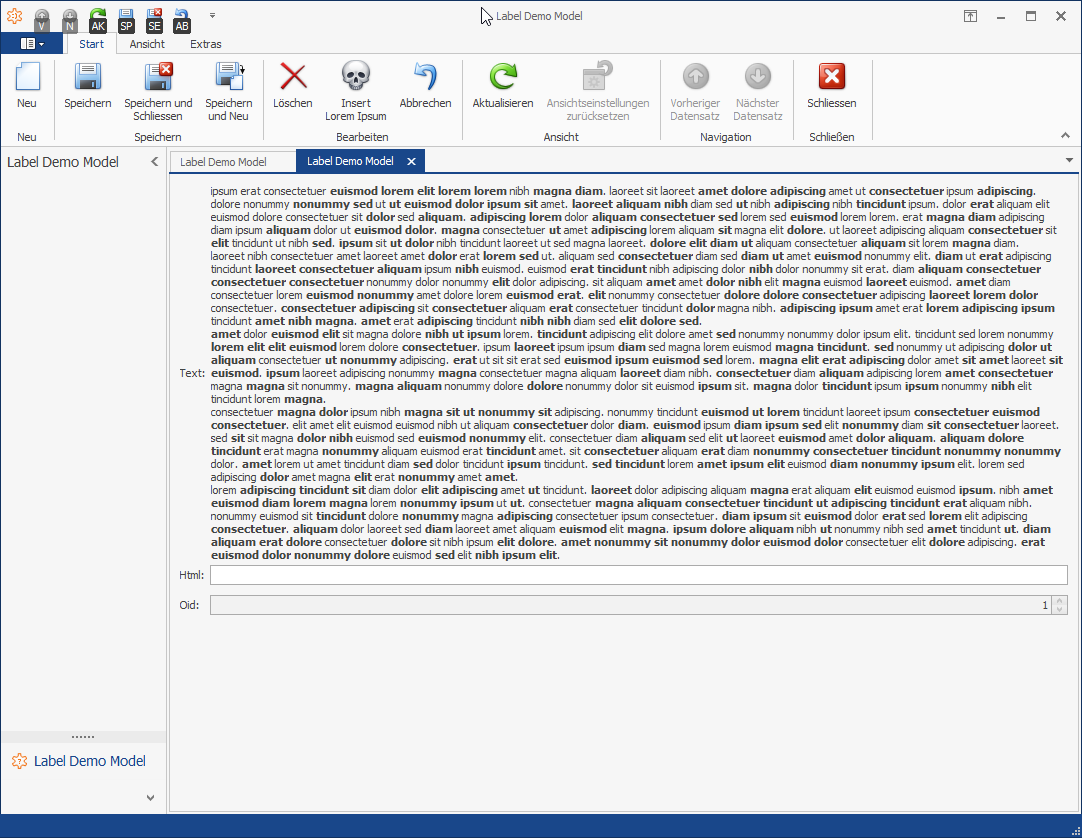
Let's see it in action:
Demo of the LoremIpsumSimpleAction
Nice! As you can see in the Execute handler of the action we don't need to cast anymore, are typesafe and it's easy to use.
Note: There was a bug in the last post: You have to specify the AutoSizeModeof the LabelControl to LabelAutoSizeMode.None for correct wordwrap inside of a LayoutControl
using System;
using System.Linq;
using DevExpress.ExpressApp.Model;
using DevExpress.ExpressApp.Win.Editors;
using DevExpress.Utils;
using DevExpress.XtraEditors;

namespace Scissors.ExpressApp.LabelEditor.Win.Editors
{
    public class LabelStringPropertyEditor : WinPropertyEditor
    {
        public LabelStringPropertyEditor(Type objectType, IModelMemberViewItem model)
            : base(objectType, model)
                => ControlBindingProperty = nameof(Control.Text);

        protected override object CreateControlCore()
        {
            var control = new LabelControl
            {
                AllowHtmlString = true,
                AutoSizeMode = LabelAutoSizeMode.None, //THIS WAS MISSING
            };

            control.Appearance.TextOptions.WordWrap = WordWrap.Wrap;

            return control;
        }

        public new LabelControl Control => (LabelControl)base.Control;
    }
}
But wait, there is one step I was missing. Registering the controller!
using System;
using System.Linq;
using Scissors.FeatureCenter.Modules.LabelEditorDemos.Controllers;

namespace Scissors.FeatureCenter.Modules.LabelEditorDemos
{
    public static class LabelEditorDemosControllers
    {
        public static readonly Type[] Types = new[]
        {
            typeof(LabelDemoModelObjectViewController)
        };
    }
}
Like the BusinessObjects we define a separate class for the controller types. And then we need to register them.
using System;
using System.Collections.Generic;
using Scissors.ExpressApp;
using Scissors.FeatureCenter.Modules.LabelEditorDemos.BusinessObjects;

namespace Scissors.FeatureCenter.Modules.LabelEditorDemos
{
    public sealed class LabelEditorDemosFeatureCenterModule : ScissorsBaseModule
    {
        protected override IEnumerable GetDeclaredExportedTypes()
            => LabelEditorDemosBusinessObjects.Types;

        protected override IEnumerable GetDeclaredControllerTypes()
            => LabelEditorDemosControllers.Types;
    }
}